Home › Templates › Fitness
Category
Gym Dashboard Templates
A gym dashboard template is a single HTML file that shows check-ins, classes, membership movement, personal training, and revenue on one page. Gym metrics tell an owner whether the floor is busy, the classes are full, and the members are staying. This page lists 1 gym template, a self-contained file at $6.99 with a live preview.
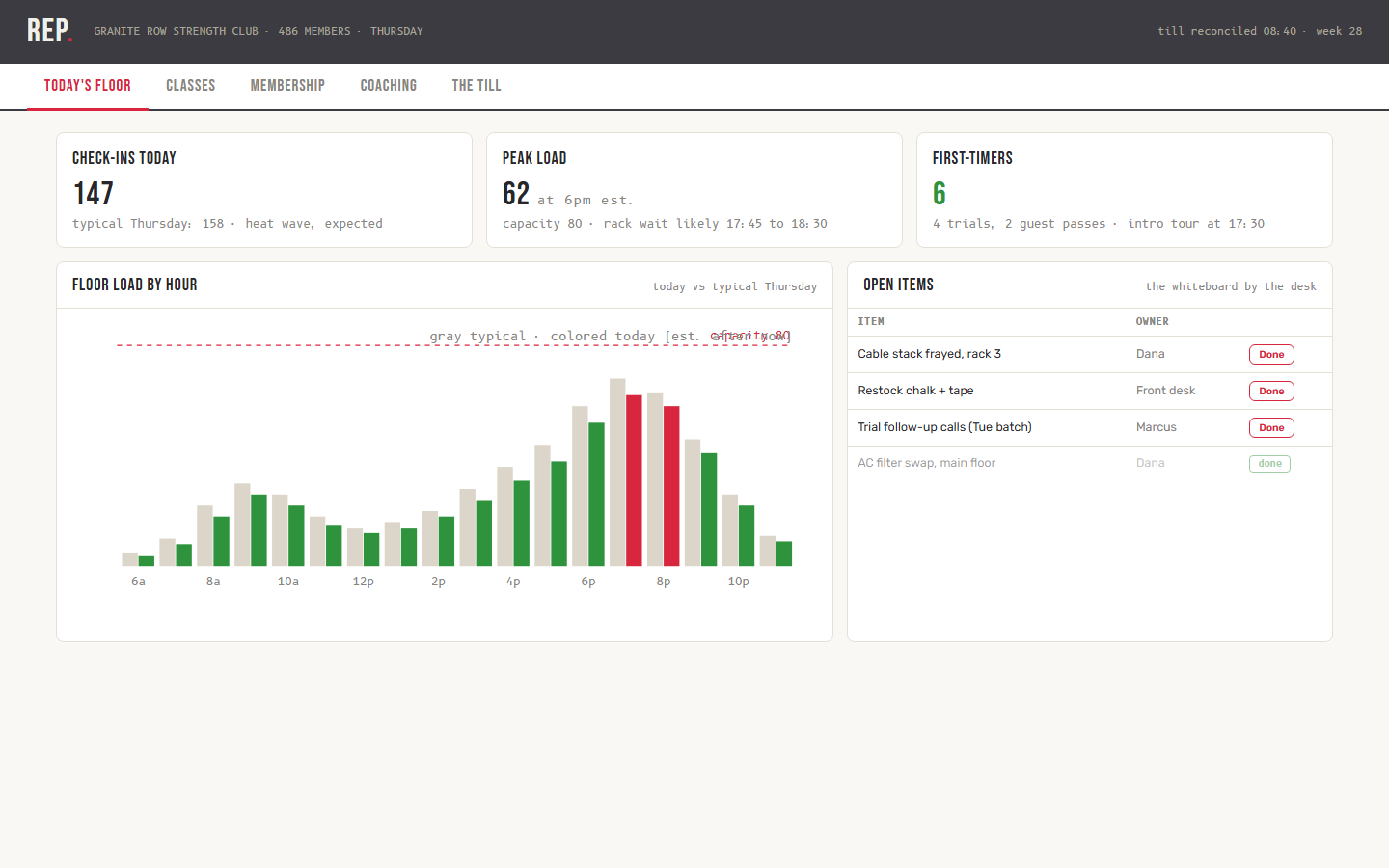
Rep models a strength club with 486 members on a Thursday, till reconciled at 08:40. The floor section shows 147 check-ins against a typical 158, a peak load of 62 at 6 pm against a capacity of 80, and 6 first-timers. The classes section draws the week's grid where clicking a slot opens roster count, waitlist, and coach notes, with fill rate by format averaged over 4 weeks. Membership charts joins against cancels over 6 months and keeps an at-risk list of members with no visit in 14 or more days. The retention math behind that list is blunt: twice-weekly attendance in the first month renews at 91 percent, and below once weekly renews at 44 percent. The till reports MRR of $38,410 at $79.03 per member, non-dues revenue of $6,270, and failed payments of $948 across 12 members on day 3 of a 10-day dunning cycle.
Compare the fitness templates
| Template | Domain | Theme | Price |
|---|
| Rep | Fitness studio, Memberships | Iron Chalk | $6.99 |
Who uses these
A gym dashboard serves 5 roles: studio owners, general managers, membership managers, head coaches, and front desk staff. Studio owners open the console at the till reconciliation and see check-ins, MRR, and failed payments in one pass. General managers watch floor load by hour and plan staffing around the 6 pm peak. Membership managers work the at-risk list and call members before they cancel instead of after. Head coaches read the personal training ledger by coach, track utilization, and chase expiring session packs. Front desk staff use the class grid for roster counts and waitlists.
When to reach for one
A gym template is the right pick when membership numbers live in the booking platform, training numbers in a spreadsheet, and revenue in the payment processor, and no one sees them together. A template joins floor, classes, members, coaching, and till on one page. Pick it also when retention is a discipline: the at-risk list and the first-month attendance math turn churn prevention into a daily call list instead of a quarterly surprise. A multi-studio operator gets a like-for-like read across clubs from the same page structure. The free Stride template applies the same model to race day operations, and the SaaS metrics guide explains the MRR math the till section uses.
Frequently asked questions
What is a gym dashboard template?
A gym dashboard template is a pre-built HTML page that displays gym metrics such as check-ins, class fill rates, membership joins and cancels, personal training utilization, and monthly recurring revenue. You download one file, replace the sample data with your club's figures, and open it in any browser.
What KPIs belong on a gym dashboard?
A gym dashboard tracks 8 KPI groups: check-ins, peak load against capacity, class fill rate, joins versus cancels, at-risk members, personal training utilization, MRR, and failed payments. Rep shows this full set plus non-dues revenue and a dunning cycle position for overdue accounts.
Can Rep pull data from our gym management software?
Yes, Rep can pull data from your gym management software with a contained change. The shipped file renders sample data embedded in the page. Connecting a platform like Mindbody or Glofox means replacing the data constants with a fetch to your system's export or API, leaving the charts, grid, and ledgers unchanged.
Does Rep handle personal training revenue?
Yes, Rep handles personal training revenue. The coaching section holds a session ledger per coach with booked, delivered, no-shows, and utilization, plus a list of session packs expiring within 30 days. Personal training also appears in the non-dues revenue split at 71 percent of $6,270 per month.
 Dashboard
 $6.99
New
Rep is a single-file HTML dashboard template that tracks check-ins, classes, membership, personal training, and revenue for a fitness studio.
check-in KPI of 147 today against a typical Thursday of 158, with a note on the heat wavepeak load of 62 at 6 pm against a capacity of 80 with a rack wait windowfloor load by hour chart comparing today against a typical Thursday
Buy now · $6.99Live preview
$6.99
New
Rep is a single-file HTML dashboard template that tracks check-ins, classes, membership, personal training, and revenue for a fitness studio.
check-in KPI of 147 today against a typical Thursday of 158, with a note on the heat wavepeak load of 62 at 6 pm against a capacity of 80 with a rack wait windowfloor load by hour chart comparing today against a typical Thursday
Buy now · $6.99Live preview