Home › Templates › HR
Category
HR Dashboard Templates
An HR dashboard template is a single HTML file that renders people operations metrics in a browser. People operations metrics include headcount, attrition, hiring pipeline, time off, and compensation. This page lists 1 HR template, a self-contained file you preview live, buy for $6.99, and edit in any text editor.
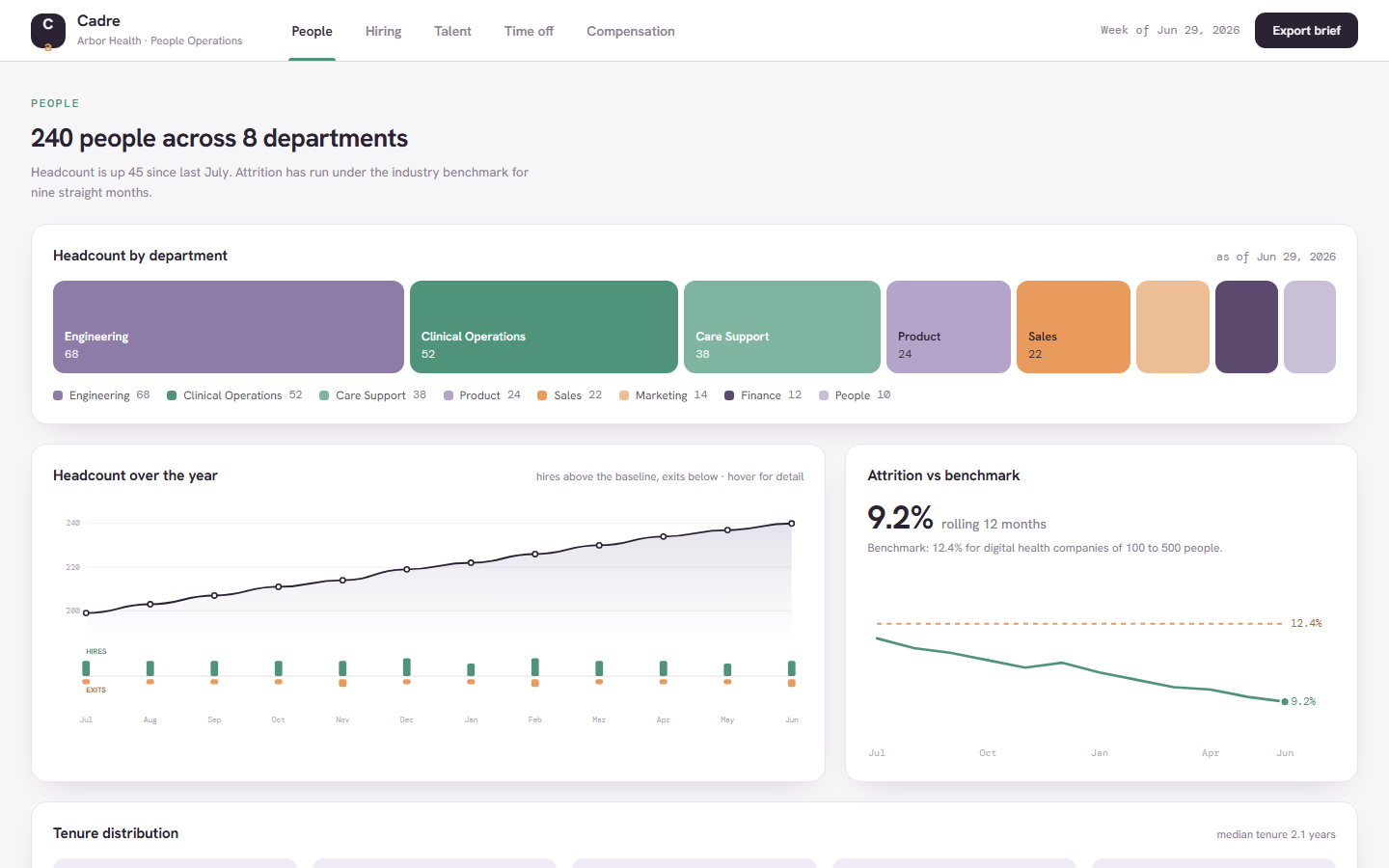
The category holds one template, built deep rather than broad. Cadre models a 240-person digital health company across 5 tabs: People, Hiring, Talent, Time off, and Compensation. Headcount is up 45 since last July, rolling attrition runs at 9.2% against a 12.4% industry benchmark, and median tenure sits at 2.1 years. The Hiring tab holds 6 open requisitions and 17 candidates in a kanban pipeline, with an 87% offer acceptance rate and 2 requisitions flagged past 35 days. The Talent tab plots a nine-box grid for a 32-person leadership cohort with 5 people flagged promotion-ready. The Compensation tab charts 43 sampled salaries against approved bands, a $3.23M equity vesting schedule, and a $1,840,000 review pool at 71% allocated.
Compare the hr templates
| Template | Domain | Theme | Price |
|---|
| Cadre | HR, People ops | Porcelain | $6.99 |
Who uses these
An HR dashboard serves 5 roles: HR directors, recruiters, HR business partners, people ops generalists, and compensation analysts. HR directors brief leadership from the People tab: headcount by department, attrition against the 12.4% benchmark, and tenure distribution. Recruiters work the hiring kanban and watch the 2 requisitions flagged over 35 days open. HR business partners run review cycles from the nine-box grid and the 84% completion tracker. People ops generalists read the 2026 time-off heatmap for coverage risk, where any week over 10% out triggers a check. Compensation analysts prepare the July cycle from the salary band chart and the review pool breakdown. The sample data assumes a company of 100 to 500 people, which is the range where these 5 roles first need one shared page.
When to reach for one
An HR dashboard template is the right pick when people data lives in three spreadsheets and a slide deck that gets rebuilt every month. A template pairs headcount, attrition, and tenure on one tab, so the monthly headcount deck becomes a page you update in a single script block. Pick it also when an HRIS reporting module is priced for a company twice your size: a $6.99 HTML file opens in any browser, keeps employee data on your own machine, and skips the implementation project. For adjacent reading, the admin templates cover back-office consoles, and the KPI card design guide explains how panels like the headcount card are laid out.
Frequently asked questions
What is an HR dashboard template?
An HR dashboard template is a pre-built HTML page that displays people metrics such as headcount, attrition, hiring pipeline, time off, and compensation. You download one file, replace the sample data with your own figures, and open it in any browser. No HRIS connector or backend is required.
Does the HR template connect to my HRIS?
No, the HR template does not connect to an HRIS. Cadre is a static single-file template with sample data for a fictional 240-person company. You adapt it by editing the values and arrays inside the file, which also means no employee data leaves your machine.
What size company does the HR template fit?
The HR template fits companies of roughly 100 to 500 people. The benchmark figures, the 32-person leadership cohort, and the $1,840,000 comp review pool in the sample data all assume that size. Smaller teams can still use it by trimming the tabs they do not need.
Can I edit the nine-box talent grid?
Yes, the nine-box talent grid is editable. The grid plots each person as a dot positioned by performance and potential, and every dot is a data entry in the file. You change names, positions, and cohort size by editing those entries in a text editor.
 Dashboard
 $6.99
New
Cadre is a single-file HTML dashboard for people operations: headcount, hiring pipeline, nine-box talent review, time off, and compensation in five tabs.
headcount KPI of 240 people across 8 departments, with charts for headcount by department and hires vs exits over the yearattrition panel at 9.2% rolling 12 months against a 12.4% benchmark for digital health companies of 100 to 500 peopletenure distribution chart with a 2.1-year median
Buy now · $6.99Live preview
$6.99
New
Cadre is a single-file HTML dashboard for people operations: headcount, hiring pipeline, nine-box talent review, time off, and compensation in five tabs.
headcount KPI of 240 people across 8 departments, with charts for headcount by department and hires vs exits over the yearattrition panel at 9.2% rolling 12 months against a 12.4% benchmark for digital health companies of 100 to 500 peopletenure distribution chart with a 2.1-year median
Buy now · $6.99Live preview