Home › Templates › Marine
Category
Marina Dashboard Templates
A marina dashboard template is a single HTML file that renders harbor operations in a browser. Harbor operations answer the harbormaster's afternoon question: what is berthed, what is due, and what is broken. This page lists the marina category, where each template is a self-contained file you preview live, buy for $6.99, and edit in any text editor.
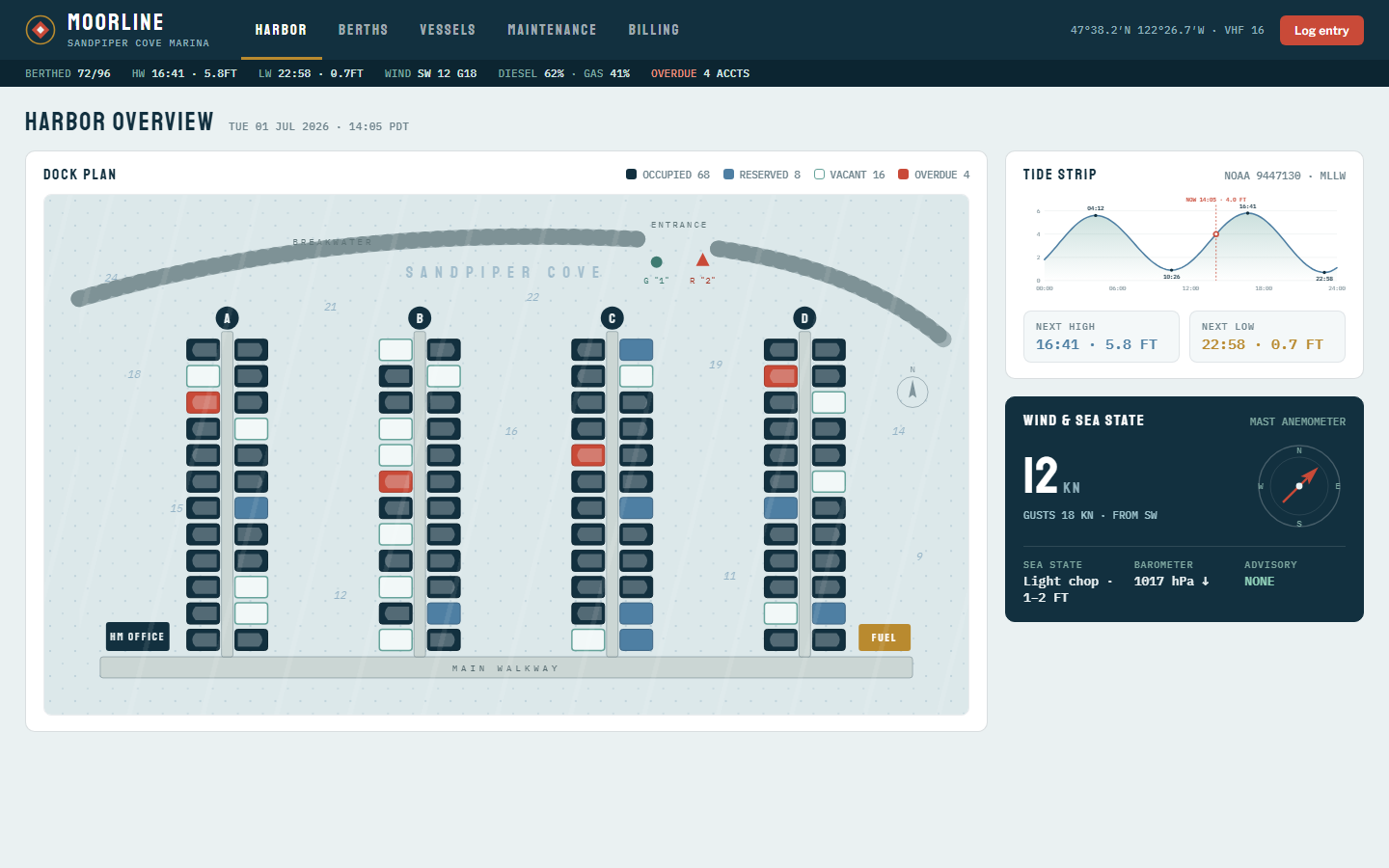
The category opens with Moorline, which models Sandpiper Cove Marina, a 96-slip harbor monitoring VHF 16 at 47°38.2'N 122°26.7'W. The Harbor view opens with a dock plan, a tide strip from NOAA station 9447130 with the next high at 16:41 and 5.8 ft, and a wind panel reading 12 knots gusting 18 from the SW. Berths carries occupancy by pier and a slip ledger with vessel, LOA and beam, rate, paid-through date, and status, plus a 7 party waitlist. Maintenance lists work orders beside fuel dock stick readings at 62% diesel and 41% gasoline and shore power load per pier. Billing closes with fiscal-year moorage revenue, a 4 class rate card, and the overdue accounts list.
Compare the marine templates
| Template | Domain | Theme | Price |
|---|
| Moorline | Marina, Harbor ops | Chart Navy | $6.99 |
Who uses these
A marina dashboard serves 5 roles: harbormasters, dock managers, yard supervisors, service writers, and bookkeepers. The harbormaster starts the afternoon on the Harbor view, where tide windows and sea state at 1 to 2 ft light chop decide whether haul-outs and fuel dock traffic proceed. The dock manager lives in the slip ledger, where paid-through dates across 96 slips surface who is overdue before the monthly statement run. The yard supervisor lines the travelift schedule from July 6 to August 31 up against work orders so bottom jobs and engine work share one yard visit. The service writer advances orders on the board and checks shore power before assigning berths: pier C draws 176 of 200 amps, so a new liveaboard goes to pier A at 124. The bookkeeper runs the Billing view, with rates from $14.25 per foot on pier A to $18.60 on pier D plus liveaboard and 30A power surcharges.
When to reach for one
A marina template is the right pick when the harbor runs on a grease-pencil dock map and a three-ring slip binder at the harbormaster's desk. A template gives the office, the yard, and the fuel dock the same numbers in one file, and the Chart Navy theme with mono numerals reads between VHF calls. Pick it also at the start of the season, when 96 slips turn over, the waitlist of 7 parties gets placed, and winter rates switch to season rates on the rate card. Operators who run lodging beside the harbor should look at Portico for the front office, and anyone wiring the tide strip to a live feed should read the customization guide first.
Frequently asked questions
What is a marina dashboard template?
A marina dashboard template is a pre-built HTML page that displays harbor metrics such as berth occupancy, slip billing, tides, haul-out schedules, and fuel dock levels. You download one file, replace the sample records with your own, and open it in any browser. No server, database, or build step is required.
What KPIs belong on a marina dashboard?
A marina dashboard tracks 6 KPI groups: berth occupancy by pier, paid-through status, waitlist depth, haul-out bookings, fuel dock stick readings, and shore power load per feed. Moorline shows this full set plus fiscal-year moorage revenue against a 4 class rate card and an overdue accounts list.
Does Moorline pull live tide and weather data?
No, Moorline does not pull live tide and weather data. The tide strip, wind, and barometer are sample readings styled after NOAA data. A real tide API or anemometer feed can replace them without touching the design.
Can I change the number of slips and rates?
Yes, you can change the number of slips and rates. The 96 slips, 4 piers, and rate classes are data in the single file, so adding a pier or re-rating a slip class is an edit to ledger rows and rate card values, not a rebuild.
 Dashboard
 $6.99
Moorline is a single-file HTML dashboard for a 96 slip marina: dock plan, tides, berth ledger, haul-out schedule, fuel dock, shore power, and moorage billing.
dock plan with berth states and a tide strip from NOAA station 9447130, next high at 16:41 and 5.8 ftwind and sea state panel: 12 knots gusting 18 SW, light chop at 1 to 2 ft, barometer 1017 hPa falling, no advisoryoccupancy by pier across 96 slips with a season rate of $14.25 per foot
Buy now · $6.99Live preview
$6.99
Moorline is a single-file HTML dashboard for a 96 slip marina: dock plan, tides, berth ledger, haul-out schedule, fuel dock, shore power, and moorage billing.
dock plan with berth states and a tide strip from NOAA station 9447130, next high at 16:41 and 5.8 ftwind and sea state panel: 12 knots gusting 18 SW, light chop at 1 to 2 ft, barometer 1017 hPa falling, no advisoryoccupancy by pier across 96 slips with a season rate of $14.25 per foot
Buy now · $6.99Live preview