Home › Templates › Safety
Category
Construction Safety Dashboard Templates
A construction safety dashboard template is a single HTML file that renders a site's safety board in a browser. The safety board answers the HSE coordinator's first question of shift: is it safe to start, and what expires today. This page lists the construction safety category, where each template is a self-contained file you preview live, buy for $6.99, and edit in any text editor.
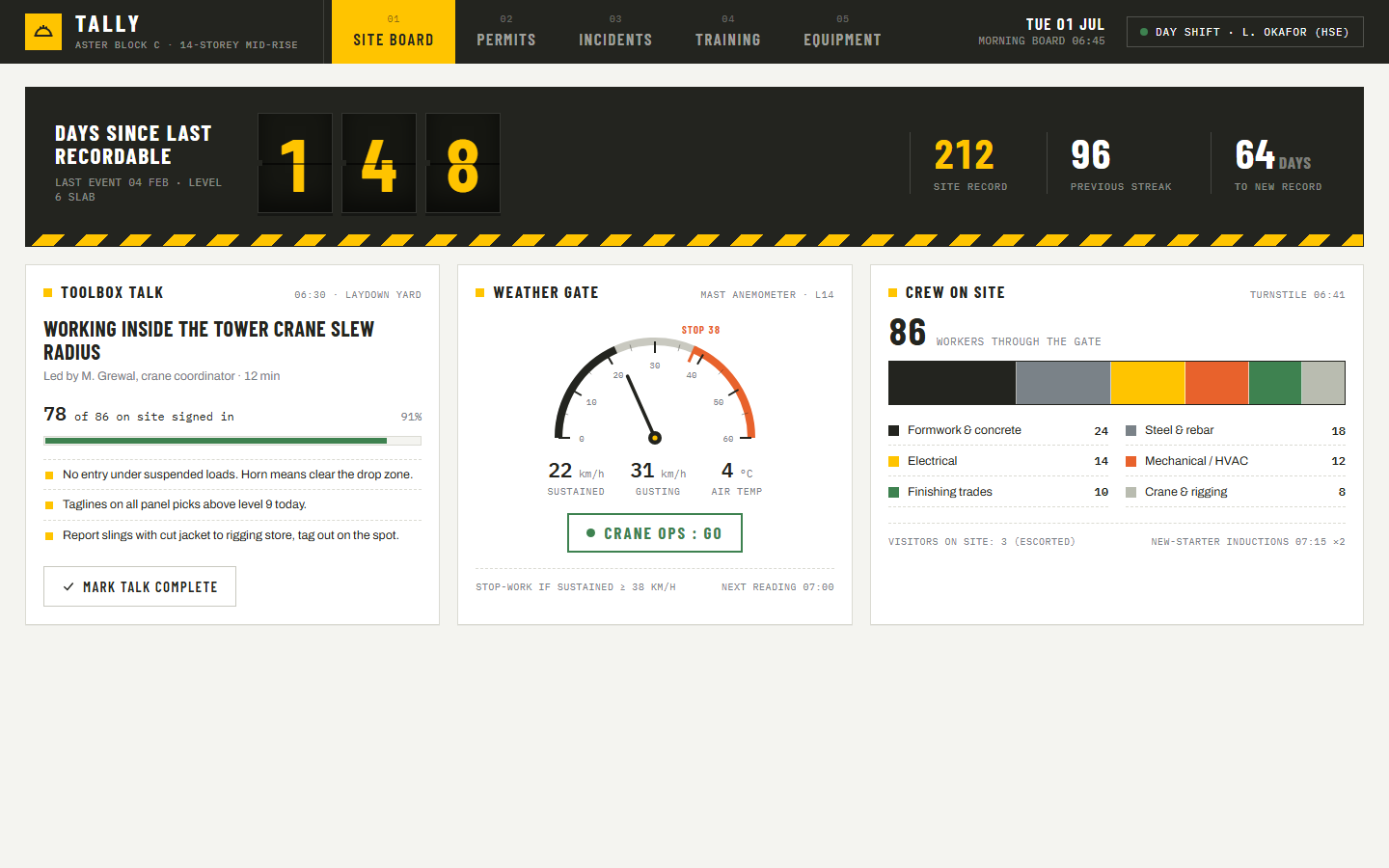
The category opens with Tally, a morning board for Aster Block C, a 14-storey mid-rise at 06:45 on day shift. Tally leads with the number every crew knows: 148 days since the last recordable, 64 days short of the 212 day site record. Beside the counter sit the toolbox talk with 78 of 86 workers signed in, a weather gate reading 22 km/h sustained against a 38 km/h stop-work limit with crane ops at GO, and a turnstile count of 86 workers plus 3 escorted visitors. Four more sections carry the compliance work: a permit peg board with 11 active permits and 3 expiring within 2 hours, a TRIF trend at 0.9 per 200,000 hours against a 1.50 corporate target, a certification matrix across 5 high-risk tickets, and inspection registers with a defect log where a frayed harness sits quarantined.
Compare the safety templates
| Template | Domain | Theme | Price |
|---|
| Tally | Construction, Site safety | Hi-Vis | $6.99 |
Who uses these
A construction safety dashboard serves 5 roles: HSE coordinators, site superintendents, safety managers, training coordinators, and lift directors. The HSE coordinator runs the pre-start meeting off the board, because the talk topic, the 91% sign-in rate, the wind reading, and the permit counts are the first 5 minutes of shift. The site superintendent watches the peg board, where 3 permits expiring within 2 hours decide where work stops at shift change. The safety manager reports from the Incidents section, which holds an event Pareto over 45 YTD events and the last 6 log entries from near miss to recordable. The training coordinator works the certification matrix, where Fall Arrest, WHMIS, Aerial Lift, Confined Space, and First Aid each carry 4 states per worker and 5 tickets flag for the next 30 days. The lift director reads the Tower Crane TC-1 panel, a Liebherr 172 EC-B with 6 days to its quarterly inspection.
When to reach for one
A construction safety template is the right pick when the site's safety record lives on a whiteboard by the trailer door and a paper permit peg board. A template gives every reader the same numbers in the same layout, and the Hi-Vis theme with condensed uppercase stats reads across a laydown yard on a site TV. Pick it also when the monthly safety report is a spreadsheet rebuilt by hand: the TRIF trend, event Pareto, incident log, and certification matrix are the same 4 exhibits, already laid out. Sites that also need schedule and cost tracking pair the safety board with Gantry, the project portfolio dashboard, and anyone re-skinning the stat chips should read the KPI card design guide first.
Frequently asked questions
What is a construction safety dashboard template?
A construction safety dashboard template is a pre-built HTML page that displays site safety metrics such as days since the last recordable, permit status, TRIF, training tickets, and equipment inspections. You download one file, replace the sample records with your own, and open it in any browser. No server, database, or build step is required.
What KPIs belong on a construction safety dashboard?
A construction safety dashboard tracks 6 KPI groups: days since recordable, crew sign-in rate, weather against stop-work limits, active and expiring permits, TRIF per 200,000 hours, and certification status for high-risk tickets. Tally shows this full set plus an event Pareto over 45 YTD events and inspection registers with a defect log.
Is Tally a full safety management system?
No, Tally is not a full safety management system. Tally is a front-end template: permits, incidents, tickets, and inspections are sample records rendered in the browser. You get the board layout and interactions, and connect your own data behind it.
Can I change the ticket types and stop-work limits?
Yes, you can change the ticket types and stop-work limits. The 5 certification columns are table headers in the file, the 4 cell states are styled classes, and the 38 km/h stop-work threshold is a value in the script. Anyone comfortable editing HTML can adapt the board in an afternoon.
 Dashboard
 $6.99
Tally is a single-file HTML safety board for a construction site: days since recordable, permits, TRIF trend, training tickets, and equipment inspections.
days since last recordable counter at 148 with site record of 212 and 64 days to a new recordtoolbox talk card with topic, leader, duration, and 78 of 86 workers signed in at 91%weather gate with 22 km/h sustained wind, 31 km/h gusts, a 38 km/h stop-work threshold, and a crane ops GO call
Buy now · $6.99Live preview
$6.99
Tally is a single-file HTML safety board for a construction site: days since recordable, permits, TRIF trend, training tickets, and equipment inspections.
days since last recordable counter at 148 with site record of 212 and 64 days to a new recordtoolbox talk card with topic, leader, duration, and 78 of 86 workers signed in at 91%weather gate with 22 km/h sustained wind, 31 km/h gusts, a 38 km/h stop-work threshold, and a crane ops GO call
Buy now · $6.99Live preview