Home › Templates › Cinema
Category
Cinema Dashboard Templates
A cinema dashboard template is a single HTML file that renders one evening of box office trade in a browser. Box office trade includes ticket grosses, seat occupancy, concession sales, and membership. This page lists 1 cinema template, a self-contained file that is free to download and opens in any browser with no build step.
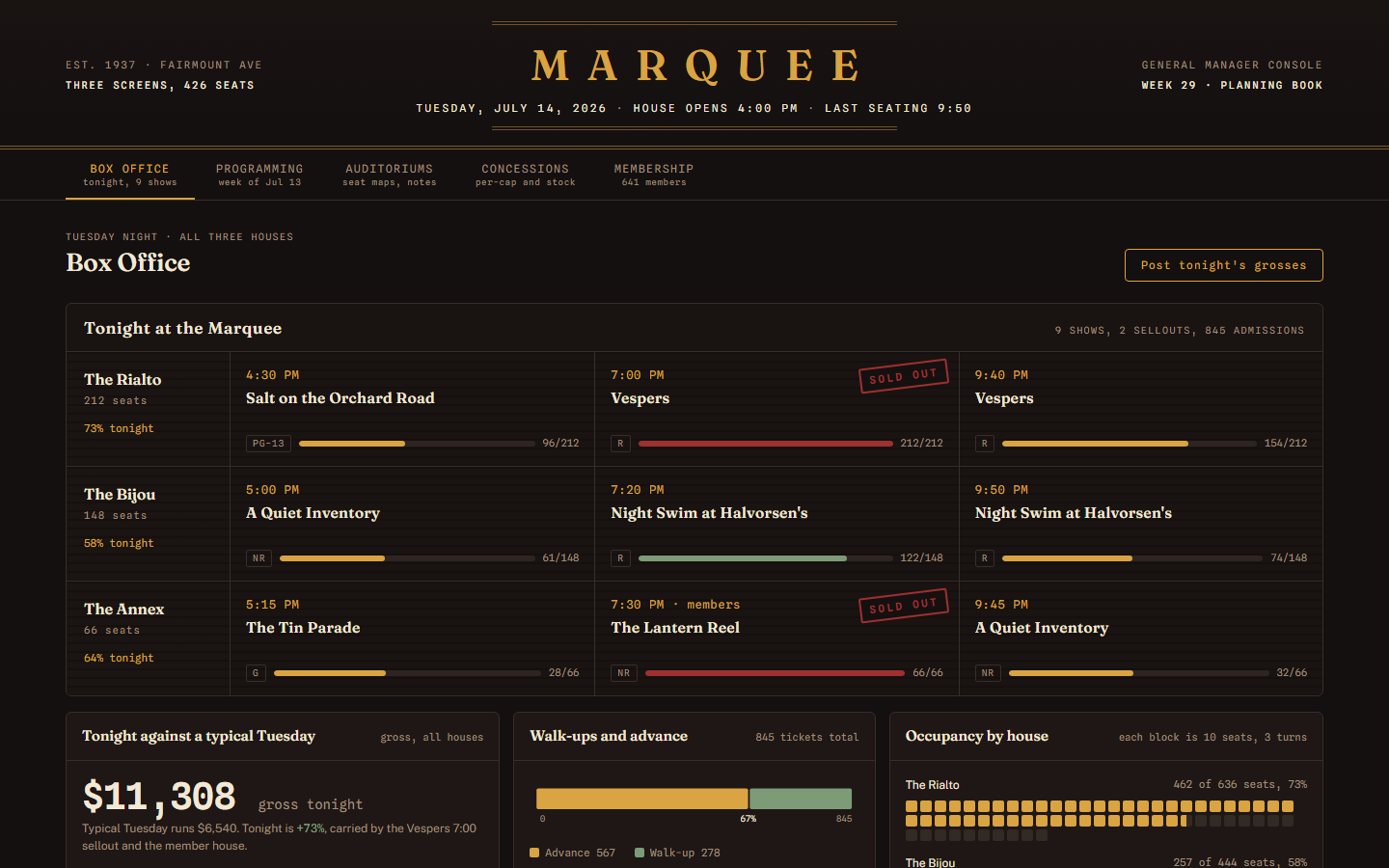
The category holds one template, and it costs nothing. Marquee models a three-screen cinema with 426 seats on a Tuesday with 9 shows across all houses. The console posts tonight's grosses against a typical Tuesday with a walk-up versus advance split, draws occupancy as seat blocks of 10 seats across 3 turns, and charts nightly gross for seven nights with Monday marked dark. A programming section carries a booking calendar and a distributor terms table with rental percentage and gross this week per title. Concessions tracks per-cap against a $5.25 house target plus stock against par, and membership counts 641 members across three tiers with a July renewal ledger.
Compare the cinema templates
| Template | Domain | Theme | Price |
|---|
| Marquee | Cinema, Box office | Velvet Gold | Free |
Who uses these
A cinema dashboard serves 5 roles: general managers, box office managers, film bookers, concessions leads, and membership coordinators. General managers open the console before the evening shows and check grosses, occupancy, and per-cap in one pass. Box office managers watch walk-up versus advance sales to decide how late to keep the box staffed. Film bookers track distributor terms and rental percentages to plan which title moves houses next week. Concessions leads compare per-cap against the $5.25 target and check stock against par before the weekend. Membership coordinators monitor tier counts, renewal anniversaries, and RSVP lists for member-only screenings. The console renders in the Velvet Gold theme, dark enough to read from a dim office behind the box.
When to reach for one
A cinema template is the right pick when nightly figures live in a spreadsheet someone retypes after close. A template replaces that sheet with one page that reads top to bottom: grosses, occupancy, stand trade, members. Pick it also for the week-ahead planning rhythm, where the booking calendar and distributor terms table answer a GM's Tuesday questions without opening the ticketing system's export. Marquee is one of the 6 free templates in the catalog, so testing whether a single-page console beats the weekly slide deck costs nothing; the free versus paid comparison explains what the paid files add. The data sits inside the HTML file, so wiring in a live feed from a POS or ticketing API later is a scripting job, not a redesign.
Frequently asked questions
Is the cinema dashboard template free?
Yes, the Marquee cinema dashboard template is free. You download one HTML file, open it in a browser, and the full console renders with its sample data for a three-screen, 426-seat cinema. No account, license key, or build tool is required.
What does a cinema dashboard template track?
A cinema dashboard template tracks 5 areas: box office grosses with a walk-up versus advance split, occupancy by auditorium, concessions per-cap against a $5.25 target, distributor terms per title, and membership across three tiers. Marquee adds a projection and HVAC ledger for house notes.
Does the cinema dashboard update in real time?
No, the cinema dashboard does not update in real time. The shipped file renders static sample data for one evening, stamped with a fixed date. Real-time updates come from connecting your own POS or ticketing feed to the existing sections with a small script change.
Can I swap in my own cinema's films and figures?
Yes, you can swap in your own cinema's films and figures. All data lives inside the HTML file as plain markup and script constants. You edit titles, grosses, seat counts, and member rows directly in a text editor, or wire the page to a JSON feed from your ticketing system.
 Dashboard
 Free
New
Marquee is a single-file HTML dashboard template that tracks box office grosses, seat occupancy, concessions, and membership for a three-screen cinema.
tonight against a typical Tuesday panel with gross across all houses and a walk-up versus advance splitoccupancy by house drawn as seat blocks, each block 10 seats across 3 turnsnightly gross bar chart for seven nights with Monday marked dark
Download freeLive preview
Free
New
Marquee is a single-file HTML dashboard template that tracks box office grosses, seat occupancy, concessions, and membership for a three-screen cinema.
tonight against a typical Tuesday panel with gross across all houses and a walk-up versus advance splitoccupancy by house drawn as seat blocks, each block 10 seats across 3 turnsnightly gross bar chart for seven nights with Monday marked dark
Download freeLive preview